Showing posts with label #Android. Show all posts

May 21, 2017

Android Progress Dialog with Admob Native Ad with loading percentage


January 28, 2017

How to get GCM API & Project ID for OneSignal (FireBase)


January 26, 2017

How to show No Internet connection dialog in Android App


July 10, 2016

How to show Random Images in Android Splash Screen


December 19, 2015

How to add Animated Splash Screen to you Android App using Android Studio

THIS POST IS MOVED TO MY NEW WEBSITE WWW.ANDROIDMKAB.COM CLICK HERE TO READ THE POST

December 04, 2015

XPERIA Cars Road Trip Theme for Xperia C [PORTED]


Hi All I ported XPERIA Cars Road Trip Theme for Xperia C and all Sony Android 4.2.2 Device

Requirements:

1. Rooted Sony Xperia C or any Sony Android 4.2.2 Device
2. ES File Explorer

Installation Procedure:

- Download XPERIA Cars Road Trip Theme for Xperia C and copy it to your SD Card
- Open ES File Explorer and copy file to Device/system/app folder and reboot (Make sure you have given super user permission to ES File Exporer and permissions set to -rw -rw -r)

Note: If you Want to change theme name don't give any spaces in name.

October 15, 2015

Setup Android Studio in offline mode On Windows for Beginners

Android Studio For Beginners


I have explained everything in detail in Video present at bottom of post

Download links for Required  files for setting up Android Studio

1. JDK 7


September 12, 2015

How to decompile APK Files and get Source Code ( JAVA & XML )

Decompile APK Files and get Source Code ( JAVA & XML )


Requirements:

3. JD-GUI
4. Your APK file to decompile

Watch Below Video For Detailed Steps:


June 03, 2015

Create Custom Xperia Themes For Any Xperia Device Both Android 4.2.2 and Android 4.3 and Above


Requirements:


1.   JDK Installed
2.   APK Tool
3.   APK Signer
4.   Rooted Xperia Device ( Only For Android 4.2.2 )
4.1  Smapletheme.apk
5.    Images needed in your theme
6.    Photoshop
7.    Notepad++

Download Links at Bottom of this Post
Watch Below Video For Detailed Explanation

May 14, 2015

[Guide] Decompile Edit and Recompile SystemUI.apk


Watch below video For Detail Instructions. Downloads at bottom of the POST


  Downloads

APK Signer 

 APK Tool


May 10, 2015

Lollipop 5.1K-MOD For Sony Xperia C 2305

 
I am not  responsible if you brick the device. Read instructions carefully before proceeding
 CWM Zip By Me

SystemUI By: John Mark Urrera

ScreenShots:


Instrucions:

1. Your Device Must Be Rooted
2. CWM Recovery Installed
3. Reboot to CWM Recovery 
4. wipe data/factory reset=>yes
5. Wipe cache partition=>yes
6. Advanced=>wipe dalvik cahe=>yes
7.+++++Go Back++++++
8.Install zip From SD Card=> Choose Zip From sdcard=> Select Lollipop_5.0.1_For    Xperia_C2305_Karthik_M.zip from your sd card
9. Then seect Yes - Install Lolliop 5.0.1 For Xperia C2305
10. After seeing Message Install zip from sd Card Complete Reboot your Device
11. After reboot compete your basic setup.
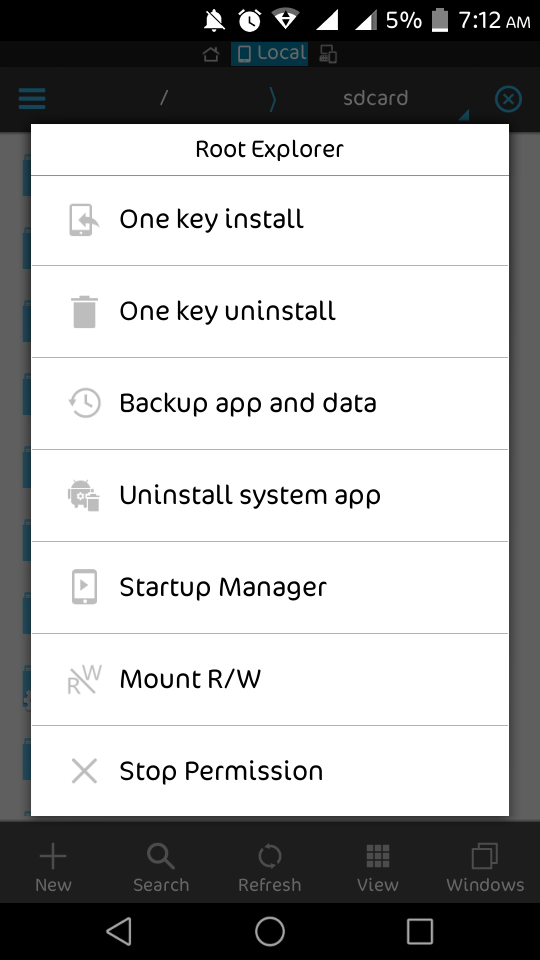
12. Open your apps menu and open ES File Explorer and do as shown in below screenshots


 13. Now close ES File explorer
 14. Reboot your Device to CWM REcovery Again
15.Install zip From SD Card=> Choose Zip From sdcard=> Select Lollipop_5.1_K-MOD_www.karthiktechfreak.blogpot.com.zip  from your sd card
16. Then seect Yes - Install Lolliop 5.0.1 For Xperia C2305
17. After seeing Message Install zip from sd Card Complete Reboot your Device
18. If you see Pure Xperia Is upgrading. Success Yenjoy.

Share My Work If You Enjoy....


  Download Links:
 Lollipop_5.0.1_For    Xperia_C2305_Karthik_M.zip

 Lollipop_5.1_K-MOD_www.karthiktechfreak.blogpot.com.zip


May 04, 2015

Pure Lollipop SystemUI For Sony Xperia C


I am not  responsible if you brick the device. Read instructions carefully before proceeding
 CWM Zip By Me

Full Credits To: John Mark Urrera

ScreenShots:


Instrucions:

1. Your Device Must Be Rooted
2. CWM Recovery Installed
3. You must install  [ROM] Android Lollipop 5.0.1 For Sony Xperia C 2305 before flashing below zip file
4. Download Pure Lollipop SystemUI for Xperia C.zip from Link Below
5. Copy It to SD Card Root ( Not into Any other Folder )
6. Reboot to CWM Recovery
7. Install Zip from Sd Card=>Choose Zip From SD Card=> Select Pure Lollipop SystemUI for               Xperia C.zip=> Select Yes
8. After Flashing Reboot Your Device
9. See a Notification Pure Xperia Upgrading Succes ( Enjoy.........!)

Download From Here

April 15, 2015

Install CWM Recovery in Xperia C With S1 Boot Version 2.14.J.0.68


For the unlucky users running on Boot Version 2.14.J.0.68 like me, we have finally discovered the solution by which we can successfully install CWM on Xperia C . This procedure will guide you to successfully first port to  S1 Boot Version 2.14.J.2.16 and then you can finally Install CWM on Xperia C using Mobile Uncle Tools

For Instructions To Change S1 Boot Version of Xperia C Watch Below Video


After Changing S1 Boot Version From  2.14.J.0.68 to 2.14.J.2.16 Watch Below Video For Installing CWM Recovery Using Mobile Uncle Tools


DOWNLOAD LINKS


April 06, 2015

[SCREENSHOTS ONLY] Android Lollipop 5.0.1 For Sony Xperia C


For Download And Live Demo Go Here

Screenshots of Sony Xperia C Running With Android Lollipop 5.0.1


                                  For Download And Live Demo Go Here


                                For Download And Live Demo Go Here


                                   For Download And Live Demo Go Here