Showing posts with label Xperia C. Show all posts

December 04, 2015

XPERIA Cars Road Trip Theme for Xperia C [PORTED]


Hi All I ported XPERIA Cars Road Trip Theme for Xperia C and all Sony Android 4.2.2 Device

Requirements:

1. Rooted Sony Xperia C or any Sony Android 4.2.2 Device
2. ES File Explorer

Installation Procedure:

- Download XPERIA Cars Road Trip Theme for Xperia C and copy it to your SD Card
- Open ES File Explorer and copy file to Device/system/app folder and reboot (Make sure you have given super user permission to ES File Exporer and permissions set to -rw -rw -r)

Note: If you Want to change theme name don't give any spaces in name.

June 05, 2015

[ 4.2.2 ] PORTED XPERIA 4.3 THEMES COLLECTION FOR XPERIA C

[ PORT ] XPERIA™ Panda Theme For Sony Xperia C

Requirements:

Rooted Xperia C
Knowledge on Using Root Explorer

Installation Proedure:

1) Download and Copy to your SD Card
2) Using ES File Explorer Copy Panda.apk to Device/System/app/
3) Reboot
4) Now go to Themes Apply Panda Theme and Enjoy


Download Panda Theme

[ PORT ] XPERIA™ Cool Foggy Theme For Sony Xperia C


Requirements:

Rooted Xperia C
Knowledge on Using Root Explorer

Installation Proedure:

1) Download and Copy to your SD Card
2) Using ES File Explorer Copy Cool Foggy.apk to Device/System/app/
3) Reboot
4) Now go to Themes Apply Cool Foggy Theme and Enjoy


Download Cool Foggy Theme


[ PORT ] XPERIA™ Green Theme For Sony Xperia C


Description
Xperia™ theme is a new way to make your Sony Xperia™ device truly personal. Download gorgeous and high quality themes developed uniquely for your Xperia™ smartphone. Change up to several hundred graphical assets in a fully integrated and easy-to-use experience.
Specifications:
- Up to 270 graphical assets
- Including Launcher and Lockscreen Wallpapers, Xperia™ Home, System UI, System Colors, Platform Components
- Including Launcher and Lockscreen Wallpapers, Xperia™ Home, System UI, System Colors


Requirements:

Rooted Xperia C
Knowledge on Using Root Explorer

Installation Proedure:

1) Download and Copy to your SD Card
2) Using ES File Explorer Copy green_theme.apk to Device/System/app/
3) Reboot
4) Now go to Themes Apply Green Theme and Enjoy


Download Green Theme

[ PORT ] XPERIA™ Poker Theme For Sony Xperia C


Description
Xperia™ theme is a new way to make your Sony Xperia™ device truly personal. Download gorgeous and high quality themes developed uniquely for your Xperia™ smartphone. Change up to several hundred graphical assets in a fully integrated and easy-to-use experience.
Specifications:
- Up to 270 graphical assets
- Including Launcher and Lockscreen Wallpapers, Xperia™ Home, System UI, System Colors, Platform Components
- Including Launcher and Lockscreen Wallpapers, Xperia™ Home, System UI, System Colors


Requirements:

Rooted Xperia C
Knowledge on Using Root Explorer

Installation Proedure:

1) Download and Copy to your SD Card
2) Using ES File Explorer Copy Poker.apk to Device/System/app/
3) Reboot
4) Now go to Themes Apply Mad Max Theme and Enjoy


Download Poker Theme

[ PORT ] XPERIA™ Sci-fi II Theme For Sony Xperia C


Description
Xperia™ theme is a new way to make your Sony Xperia™ device truly personal. Download gorgeous and high quality themes developed uniquely for your Xperia™ smartphone. Change up to several hundred graphical assets in a fully integrated and easy-to-use experience.
Specifications:
- Up to 270 graphical assets
- Including Launcher and Lockscreen Wallpapers, Xperia™ Home, System UI, System Colors, Platform Components
- Including Launcher and Lockscreen Wallpapers, Xperia™ Home, System UI, System Colors


Requirements:

Rooted Xperia C
Knowledge on Using Root Explorer

Installation Proedure:

1) Download and Copy to your SD Card
2) Using ES File Explorer Copy scifii.apk to Device/System/app/
3) Reboot
4) Now go to Themes Apply Scifii Theme and Enjoy


Download Sci-fi II Theme

[ PORT ] XPERIA™ Manga Music Theme For Sony Xperia C


Description
Xperia™ theme is a new way to make your Sony Xperia™ device truly personal. Download gorgeous and high quality themes developed uniquely for your Xperia™ smartphone. Change up to several hundred graphical assets in a fully integrated and easy-to-use experience.
Specifications:
- Up to 270 graphical assets
- Including Launcher and Lockscreen Wallpapers, Xperia™ Home, System UI, System Colors, Platform Components
- Including Launcher and Lockscreen Wallpapers, Xperia™ Home, System UI, System Colors


Requirements:

Rooted Xperia C
Knowledge on Using Root Explorer
Works on all Xperia devices running 4.2.2 and Above
Installation Proedure:

1) Download and Copy to your SD Card
2) Using ES File Explorer Copy Manga_music.apk to Device/System/app/
3) Reboot
4) Now go to Themes Apply Manga Music Theme and Enjoy


Download Manga Music Theme

[ PORT ] XPERIA™ Polygon Theme For Sony Xperia C


Description

Xperia™ theme is a new way to make your Sony Xperia™ device truly personal. Download gorgeous and high quality themes developed uniquely for your Xperia™ smartphone. Change up to several hundred graphical assets in a fully integrated and easy-to-use experience.
Specifications:
- Up to 270 graphical assets
- Including Launcher and Lockscreen Wallpapers, Xperia™ Home, System UI, System Colors, Platform Components
- Including Launcher and Lockscreen Wallpapers, Xperia™ Home, System UI, System Colors

Full Credits To ME For Porting 

Requirements:

Rooted Xperia C
Knowledge on Using Root Explorer
Works on all Xperia Devices Running Android 4.2.2 and Up 
Installation Proedure:

1) Download and Copy to your SD Card
2) Using ES File Explorer Copy Polygon.apk to Device/System/app/
3) Reboot
4) Now go to Themes Apply Polygon Theme and Enjoy


DOWNLOAD POLYGON THEME

[ PORT ] XPERIA™ Tech World Theme For Sony Xperia C


Description
Xperia™ theme is a new way to make your Sony Xperia™ device truly personal. Download gorgeous and high quality themes developed uniquely for your Xperia™ smartphone. Change up to several hundred graphical assets in a fully integrated and easy-to-use experience.
Specifications:
- Up to 270 graphical assets
- Including Launcher and Lockscreen Wallpapers, Xperia™ Home, System UI, System Colors, Platform Components
- Including Launcher and Lockscreen Wallpapers, Xperia™ Home, System UI, System Colors

Full Credits To ME 

Requirements:

Rooted Xperia C
Knowledge on Using Root Explorer
Works on all Xperia Devices 4.2.2 and Up
Installation Proedure:

1) Download and Copy to your SD Card
2) Using ES File Explorer Copy Techworld.apk to Device/System/app/
3) Reboot
4) Now go to Themes Apply Tech World Theme and Enjoy

DOWNLOAD TECH WORLD THEME

[ PORT ] XPERIA™ Mad Max Theme For Sony Xperia C

Description
Xperia™ theme is a new way to make your Sony Xperia™ device truly personal. Download gorgeous and high quality themes developed uniquely for your Xperia™ smartphone. Change up to several hundred graphical assets in a fully integrated and easy-to-use experience.
Specifications:
- Up to 270 graphical assets
- Including Launcher and Lockscreen Wallpapers, Xperia™ Home, System UI, System Colors, Platform Components
- Including Launcher and Lockscreen Wallpapers, Xperia™ Home, System UI, System Colors


XPERIA™ Mad Max Theme Ported For Sony Xperia C 


Full Credits To ME 

Requirements:

Rooted Xperia C
Knowledge on Using Root Explorer

Installation Proedure:

1) Download and Copy to your SD Card
2) Using ES File Explorer Copy Mad_max.apk to Device/System/app/
3) Reboot
4) Now go to Themes Apply Mad Max Theme and Enjoy


Download Mad Max Theme


May 10, 2015

Lollipop 5.1K-MOD For Sony Xperia C 2305

 
I am not  responsible if you brick the device. Read instructions carefully before proceeding
 CWM Zip By Me

SystemUI By: John Mark Urrera

ScreenShots:


Instrucions:

1. Your Device Must Be Rooted
2. CWM Recovery Installed
3. Reboot to CWM Recovery 
4. wipe data/factory reset=>yes
5. Wipe cache partition=>yes
6. Advanced=>wipe dalvik cahe=>yes
7.+++++Go Back++++++
8.Install zip From SD Card=> Choose Zip From sdcard=> Select Lollipop_5.0.1_For    Xperia_C2305_Karthik_M.zip from your sd card
9. Then seect Yes - Install Lolliop 5.0.1 For Xperia C2305
10. After seeing Message Install zip from sd Card Complete Reboot your Device
11. After reboot compete your basic setup.
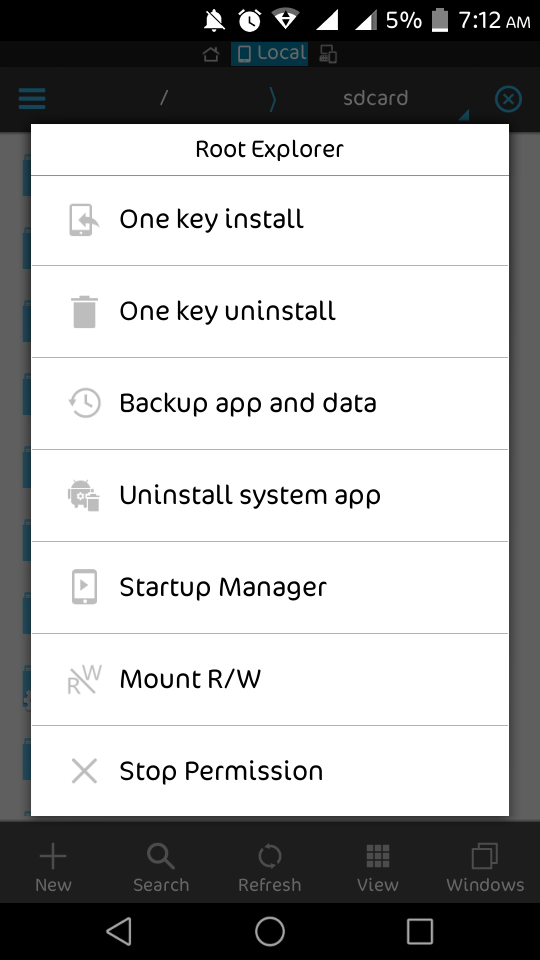
12. Open your apps menu and open ES File Explorer and do as shown in below screenshots


 13. Now close ES File explorer
 14. Reboot your Device to CWM REcovery Again
15.Install zip From SD Card=> Choose Zip From sdcard=> Select Lollipop_5.1_K-MOD_www.karthiktechfreak.blogpot.com.zip  from your sd card
16. Then seect Yes - Install Lolliop 5.0.1 For Xperia C2305
17. After seeing Message Install zip from sd Card Complete Reboot your Device
18. If you see Pure Xperia Is upgrading. Success Yenjoy.

Share My Work If You Enjoy....


  Download Links:
 Lollipop_5.0.1_For    Xperia_C2305_Karthik_M.zip

 Lollipop_5.1_K-MOD_www.karthiktechfreak.blogpot.com.zip


April 26, 2015

Xposed Installer and Modules CWM Flashable ZIP


This CWM Flash-able Package Contains

1. Xposed Installer
2. Gravity Box
3. Xperia Xposed

Instructions:

1. Download Flashable Zip and Copy it to SD Card Root
2. Reboot to CWM Recovery
3. Flash ZIP File
4. Wipe Cache
5. Wipe Dalvik Cache
6. Reboot and Enjoy

Xperia Xposed [Xposed Module] For Sony Xperia C


Requirements:

For Sony Xperia Devices Only
Xposed framework Installed

Instructions:

Download Xperia Xposed.apk and install it
Open Xposed Installer=>Modules=>Tick Mark Xperia Xposed as Showed in Above Screen Shot

And Reboot Your Device 

After Reboot Open Xperia Xposed To porform Various Tweaks

Gravity Box [Xposed Module] For Xperia C


Requirements:

Xposed framework Installed

Instructions:

Download Gravity Box 3.5.5.apk and install it
Open Xposed Installer=>Modules=>Tick Mark Gravitybox as Showed in Above Screen Shot

And Reboot Your Device 

Xposed Installer For Xperia C


How to install:
Your device Must be rooted
First step for everything you do: Create a nandroid backup and make sure you know how to restore it!
I'm not responsible for anything you do with your phone
There is also the risk to soft-brick your device. In such a case, see below for ways to recover from it.


Installation of the framework:
Download the Xposed Installer APK and install it
Launch the Xposed Installer, go to the "Framework" section and click on "Install/Update"
Reboot
Done!

You can verify this by starting the Xposed Installer again and making sure that the numbers in the "Framework" section are green.

Or It should like First Screenshot In this Post

Installation of any modules:
Download <module>.apk (e.g. via the builtin repository browser) and install it
Launch the Xposed Installer and go to the "Modules" section (you will also get there if you click on the notification warning you that the module is not enabled yet)
Enable the module by checking the checkbox
Reboot
Done!
(note that you can install the framework and enable/disable multiple modules at once and reboot afterwards)

Dolby Digital Plus For Sony Xperia C [ MOD ]


Install Using CWM Recovery

BACKUP YOUR CURRENT ROM BEFORE FLASHING THIS
Uninstall Viper FX or anyother mod you are using in your phone before installing dolby plus
Download & copy Dolby Digital Plus By Karthik M.zip to SD Card
Reboot into recovery
Install the Dolby Digital Plus By Karthik.zip
Wipe cache and dalvik cache
Reboot system now
Finished and enjoy High Quality Music Experience on Your Headphones