Showing posts with label #Lollipop. Show all posts

May 10, 2015

Lollipop 5.1K-MOD For Sony Xperia C 2305

 
I am not  responsible if you brick the device. Read instructions carefully before proceeding
 CWM Zip By Me

SystemUI By: John Mark Urrera

ScreenShots:


Instrucions:

1. Your Device Must Be Rooted
2. CWM Recovery Installed
3. Reboot to CWM Recovery 
4. wipe data/factory reset=>yes
5. Wipe cache partition=>yes
6. Advanced=>wipe dalvik cahe=>yes
7.+++++Go Back++++++
8.Install zip From SD Card=> Choose Zip From sdcard=> Select Lollipop_5.0.1_For    Xperia_C2305_Karthik_M.zip from your sd card
9. Then seect Yes - Install Lolliop 5.0.1 For Xperia C2305
10. After seeing Message Install zip from sd Card Complete Reboot your Device
11. After reboot compete your basic setup.
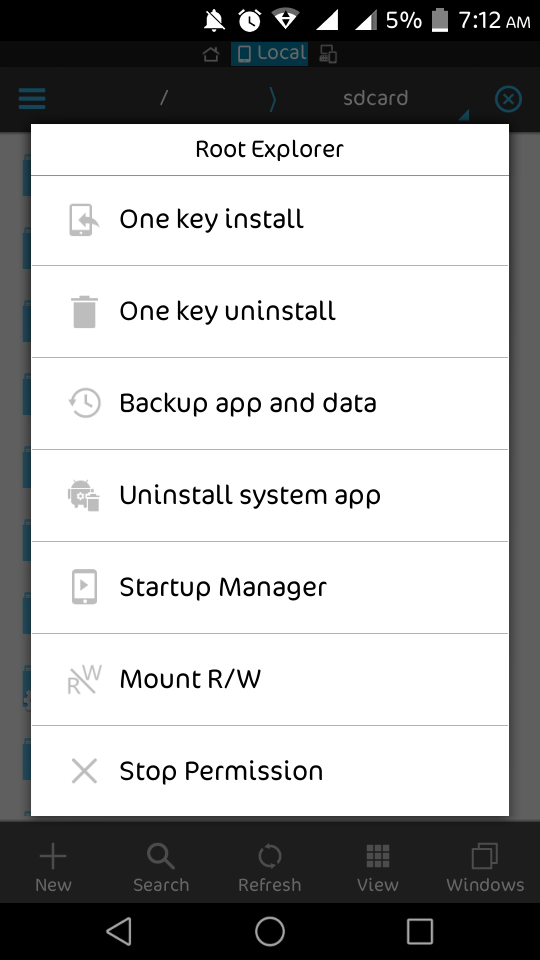
12. Open your apps menu and open ES File Explorer and do as shown in below screenshots


 13. Now close ES File explorer
 14. Reboot your Device to CWM REcovery Again
15.Install zip From SD Card=> Choose Zip From sdcard=> Select Lollipop_5.1_K-MOD_www.karthiktechfreak.blogpot.com.zip  from your sd card
16. Then seect Yes - Install Lolliop 5.0.1 For Xperia C2305
17. After seeing Message Install zip from sd Card Complete Reboot your Device
18. If you see Pure Xperia Is upgrading. Success Yenjoy.

Share My Work If You Enjoy....


  Download Links:
 Lollipop_5.0.1_For    Xperia_C2305_Karthik_M.zip

 Lollipop_5.1_K-MOD_www.karthiktechfreak.blogpot.com.zip


May 04, 2015

Pure Lollipop SystemUI For Sony Xperia C


I am not  responsible if you brick the device. Read instructions carefully before proceeding
 CWM Zip By Me

Full Credits To: John Mark Urrera

ScreenShots:


Instrucions:

1. Your Device Must Be Rooted
2. CWM Recovery Installed
3. You must install  [ROM] Android Lollipop 5.0.1 For Sony Xperia C 2305 before flashing below zip file
4. Download Pure Lollipop SystemUI for Xperia C.zip from Link Below
5. Copy It to SD Card Root ( Not into Any other Folder )
6. Reboot to CWM Recovery
7. Install Zip from Sd Card=>Choose Zip From SD Card=> Select Pure Lollipop SystemUI for               Xperia C.zip=> Select Yes
8. After Flashing Reboot Your Device
9. See a Notification Pure Xperia Upgrading Succes ( Enjoy.........!)

Download From Here

April 06, 2015

[SCREENSHOTS ONLY] Android Lollipop 5.0.1 For Sony Xperia C


For Download And Live Demo Go Here

Screenshots of Sony Xperia C Running With Android Lollipop 5.0.1


                                  For Download And Live Demo Go Here


                                For Download And Live Demo Go Here


                                   For Download And Live Demo Go Here

March 31, 2015

Android Lollipop 5.0.1 For Sony Xperia C 2305


Instructions and Download Link  at Bottom Of This Page


Watch Video Before Installation to avoid Bricking and for Supporting


METHOD OF INSTALLING THIS ROM IS DIFFERENT THAT ANY OTHER ROM, PLEASE READ THE INSTRUCTIONS VERY CAREFULLY.

"NOTE: I am Not Responsible If  Something Happens To Your device. Rooting Voids Warranty. Try at Your Own Risk"


STEP 1 : Update Your Xperia C to latest 16.0.B.2.16 firmware.

STEP 2 : Download the ROM files "Lollipop_5.0.1_For Xperia_C2305_Karthik.zip".

STEP 3 : Root Your Device. (Link here).

STEP 4 : Install CWM on your device. ( Link here).

STEP 5 : Place the Downloaded ROM files above in your SD Card and not in any folder.

STEP 6 : Now go to CWM.

STEP 7 : Clear Data/Factory Reset, Clear Cache and Advanced=> Clear Dalvik Cache.

STEP 8 : Now select Install zip from SDCard=>Choose Zip From SD Card and select                                       "Lollipop_5.0.1_For Xperia_C2305_Karthik.zip". Wait till it completes and after this is                         flashed reboot your device. 

STEP 9 : When your device starts and you get the Initial Boot Setup i.e. that language and network                     etc. After it is complete and you get on your Home Screen. 

STEP 10: DONE! Your Xperia C has Android 5.0.1 ROM and also the latest 16.0.B.2.16.  

Important Note As there is no SIM Switch Option In Status Bar. You Can Set Default SIM in Settings=>Dual SIM Settings Or Install This APP So that It Will Ask Choose SIM Just Before You Dial A Number


PLEASE COMMENT YOUR REVIEW AFTER FLASHING ROM


Optional:

                      Increase Xperia C Device Memory From 0.89GB to 1.97GB LINK HERE

DOWNLOAD SONY STOCK ALBUM MOVIES & WALKMAN APPS MATERIAL DESIGN

Click on Any Icon to Download


           DOWNLOAD LOLLIPOP ROM FOR XPERIA C


NEW UPDATE 
Pure Lollipop SystemUI For Sony Xperia C

Whats New:
Lollipop Like Recent Menu
Quick settings Icon in Status Bar
And Lots More

After Flashing Above ROM Flash This Zip File From The Download Link Under Video
Download Link And Instructions under video in description
https://youtu.be/NH-76TgnmDY

Screenshots


Share This Post With Your Friends Using Any of The Social Buttons Below. Because Sharing Is Caring